Spectral Data Cubes from a Parametric Galaxy
In this example we show the main high-level workflow for creating a spectral data cube from a parametric galaxy. We will construct an IntegratedFieldUnit and call the component cube getters for a disk and bulge before combining them. A lower-level SpectralCube example is shown afterwards.
[1]:
import matplotlib.pyplot as plt
import numpy as np
from unyt import Msun, Myr, angstrom, degree, kpc

from synthesizer.emission_models import IntrinsicEmission
from synthesizer.grid import Grid
from synthesizer.imaging import SpectralCube
from synthesizer.instruments import IntegratedFieldUnit
from synthesizer.parametric import SFH, Stars, ZDist
from synthesizer.parametric.galaxy import Galaxy
from synthesizer.parametric.morphology import Sersic2D

plt.rcParams["font.family"] = "DeJavu Serif"
plt.rcParams["font.serif"] = ["Times New Roman"]

# Set the seed
np.random.seed(42)

# Define the grid
grid_name = "test_grid"
grid = Grid(grid_name, new_lam=np.logspace(2, 5, 600) * angstrom)

# Define the SFH and metallicity distribution
metal_dist = ZDist.Normal(mean=0.015, sigma=0.005)
sfh = SFH.Constant(max_age=200 * Myr)

# Define the morphology using a simple effective radius and slope
morph = Sersic2D(
    r_eff=1 * kpc,
    sersic_index=1.0,
    ellipticity=0,
    theta=0 * degree,
)

# Create the Stars object
stars = Stars(
    grid.log10ages,
    grid.metallicities,
    sf_hist=sfh,
    metal_dist=metal_dist,
    morphology=morph,
    initial_mass=10**9.0 * Msun,
)

# Initialise a parametric Galaxy for the bulge
bulge = Galaxy(stars, redshift=3)

# Define the SFH and metallicity distribution
metal_dist = ZDist.Normal(mean=0.01, sigma=0.005)
sfh = SFH.Constant(max_age=100 * Myr)

# Define the morphology using a simple effective radius and slope
morph = Sersic2D(
    r_eff=5 * kpc,
    sersic_index=1.0,
    ellipticity=0.4,
    theta=1 * degree,
)

# Create the Stars object
stars = Stars(
    grid.log10ages,
    grid.metallicities,
    sf_hist=sfh,
    metal_dist=metal_dist,
    morphology=morph,
    initial_mass=10**9.5 * Msun,
)

# Initialise a parametric Galaxy for the disk
disk = Galaxy(stars, redshift=3)
Before we can generate a spectral data cube, we first need to generate spectra for each component.
[2]:
model = IntrinsicEmission(grid, fesc=0.1)
bulge_sed = bulge.stars.get_spectra(model)
disk_sed = disk.stars.get_spectra(model)
Spectral Data Cube Creation
We now have most of the ingredients we need to generate a spectral data cube from our galaxy. We only require parameters describing the wavelength array, the spatial resolution, and the field of view. These will be stored on an IntegratedFieldUnit for the high-level generation path.
[3]:
# Define the width of the image
width = 30 * kpc

# Define image resolution (here we arbitrarily set it to 100 pixels
# along an axis)
resolution = width / 200

# Define the wavelength array
lam = np.linspace(10**3, 10**4.5, 1000)

print(
    "Data cube spatial width is %.2f kpc with a %.2f kpc spaxel resolution"
    % (width.value, resolution.value)
)
Data cube spatial width is 30.00 kpc with a 0.15 kpc spaxel resolution
Finally, we create the individual spectral cubes, and then add them together to get the final combined galaxy spectral data cube. We will begin with the recommended high-level path where the IFU defines the cube geometry and the components generate their cubes via get_data_cube(...).
The possible cube quantities are "lnu", "luminosity" or "llam" for rest-frame luminosities, or "fnu", "flam" or "flux" for fluxes. Here we will make cubes populated with "luminosity".
[4]:
# Construct the IFU that defines the cube geometry
ifu = IntegratedFieldUnit(
    label="DemoIFU",
    resolution=resolution,
    lam=lam * angstrom,
)

# Generate component cubes via the high-level component helpers
bulge_cube = bulge.get_data_cube(
    fov=width,
    instrument=ifu,
    stellar_spectra="intrinsic",
    quantity="luminosity",
)
disk_cube = disk.get_data_cube(
    fov=width,
    instrument=ifu,
    stellar_spectra="intrinsic",
    quantity="luminosity",
)

# Combine each individual component
cube = bulge_cube + disk_cube
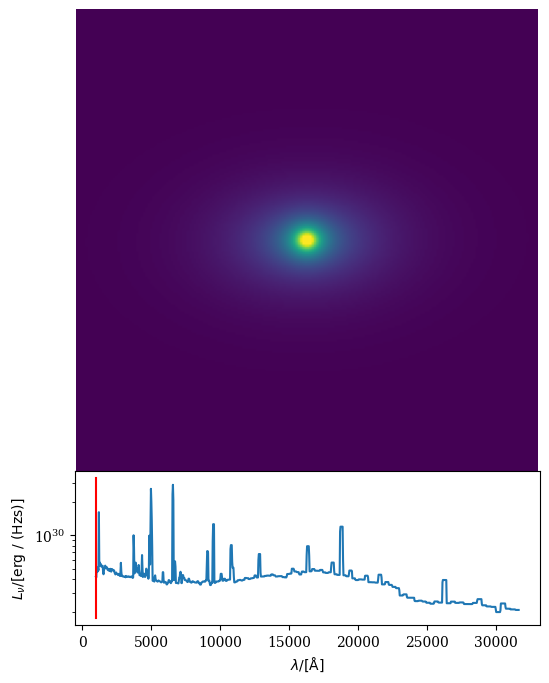
Now we have our parametric spectral data cube, cube. We can see what we’ve made by making an animation.
[5]:
# Animate the data cube
ani = cube.animate_data_cube(fps=240, show=True)
Direct SpectralCube interface
If you need more direct control, you can also work with the lower-level SpectralCube object. In that path you construct the cubes yourself and call generate_data_cube_smoothed(...) explicitly.
[6]:
bulge_cube = SpectralCube(resolution=resolution, lam=lam * angstrom, fov=width)
disk_cube = SpectralCube(resolution=resolution, lam=lam * angstrom, fov=width)

bulge_cube.generate_data_cube_smoothed(
    bulge_sed,
    quantity="lnu",
    density_grid=bulge.stars.morphology.get_density_grid(
        bulge_cube.resolution, bulge_cube.npix
    ),
)
disk_cube.generate_data_cube_smoothed(
    disk_sed,
    quantity="lnu",
    density_grid=disk.stars.morphology.get_density_grid(
        disk_cube.resolution, disk_cube.npix
    ),
)
cube = bulge_cube + disk_cube