Generate composite galaxy
Finall, in this example we’re going to demonstrate how to make a composite galaxy, including with imaging. For more information on defining parametric morphology see the Imaging examples.
[1]:
import numpy as np
from unyt import Msun, Myr, angstrom, kpc

from synthesizer.emission_models import IncidentEmission
from synthesizer.filters import UVJ
from synthesizer.grid import Grid
from synthesizer.parametric import SFH, Stars, ZDist
from synthesizer.parametric.galaxy import Galaxy
from synthesizer.parametric.morphology import Sersic2D
Let’s begin by defining the geometry of the images:
[2]:
# Define geometry of the images
resolution = 0.1 * kpc  # resolution in kpc
npix = 50
fov = resolution * npix
And initialising the Grid object:
[3]:
grid_name = "test_grid"
grid = Grid(grid_name, new_lam=np.logspace(3, 4.2, 1000) * angstrom)

print(grid)
+--------------------------------------------------------------------------------------------+
|                                            GRID                                            |
+-----------------------------+--------------------------------------------------------------+
| Attribute                   | Value                                                        |
+-----------------------------+--------------------------------------------------------------+
| grid_dir                    | '/home/runner/.local/share/Synthesizer/grids'                |
+-----------------------------+--------------------------------------------------------------+
| grid_name                   | 'test_grid'                                                  |
+-----------------------------+--------------------------------------------------------------+
| grid_ext                    | 'hdf5'                                                       |
+-----------------------------+--------------------------------------------------------------+
| grid_filename               | '/home/runner/.local/share/Synthesizer/grids/test_grid.hdf5' |
+-----------------------------+--------------------------------------------------------------+
| reprocessed                 | True                                                         |
+-----------------------------+--------------------------------------------------------------+
| lines_available             | True                                                         |
+-----------------------------+--------------------------------------------------------------+
| naxes                       | 2                                                            |
+-----------------------------+--------------------------------------------------------------+
| date_created                | '2025-09-27'                                                 |
+-----------------------------+--------------------------------------------------------------+
| synthesizer_grids_version   | '0.1.dev613+ga9a6aa9'                                        |
+-----------------------------+--------------------------------------------------------------+
| synthesizer_version         | '0.9.7b1.dev4+g00432846a'                                    |
+-----------------------------+--------------------------------------------------------------+
| has_lines                   | True                                                         |
+-----------------------------+--------------------------------------------------------------+
| has_spectra                 | True                                                         |
+-----------------------------+--------------------------------------------------------------+
| ndim                        | 3                                                            |
+-----------------------------+--------------------------------------------------------------+
| new_line_format             | True                                                         |
+-----------------------------+--------------------------------------------------------------+
| nlam                        | 1000                                                         |
+-----------------------------+--------------------------------------------------------------+
| nlines                      | 254                                                          |
+-----------------------------+--------------------------------------------------------------+
| shape                       | (51, 13, 1000)                                               |
+-----------------------------+--------------------------------------------------------------+
| available_spectra_emissions | [incident, linecont, nebular, transmitted,                   |
|                             |  nebular_continuum, ]                                        |
+-----------------------------+--------------------------------------------------------------+
| available_line_emissions    | [nebular, linecont, nebular_continuum, transmitted,          |
|                             |  incident, ]                                                 |
+-----------------------------+--------------------------------------------------------------+
| available_emissions         | [nebular, incident, nebular_continuum, linecont,             |
|                             |  transmitted, ]                                              |
+-----------------------------+--------------------------------------------------------------+
| axes                        | [ages, metallicities]                                        |
+-----------------------------+--------------------------------------------------------------+
| available_spectra           | [incident, linecont, nebular, transmitted,                   |
|                             |  nebular_continuum, ]                                        |
+-----------------------------+--------------------------------------------------------------+
| available_lines (254,)      | [He 2 1025.27A, O 6 1031.91A, O 6 1037.61A, ...]             |
+-----------------------------+--------------------------------------------------------------+
| lam (1000,)                 | 1.00e+03 Å -> 1.58e+04 Å (Mean: 5.38e+03 Å)                  |
+-----------------------------+--------------------------------------------------------------+
| line_lams (254,)            | 1.03e+03 Å -> 3.38e+07 Å (Mean: 1.63e+06 Å)                  |
+-----------------------------+--------------------------------------------------------------+
| incident_axes               | ['ages' 'metallicities']                                     |
+-----------------------------+--------------------------------------------------------------+
| spec_names (4,)             | [incident, transmitted, nebular, ...]                        |
+-----------------------------+--------------------------------------------------------------+
| line_ids (254,)             | [He 2 1025.27A, O 6 1031.91A, O 6 1037.61A, ...]             |
+-----------------------------+--------------------------------------------------------------+
| stellar_fraction (51, 13)   | 3.24e-01 -> 1.00e+00 (Mean: 6.56e-01)                        |
+-----------------------------+--------------------------------------------------------------+
| spectra                     | incident: ndarray                                            |
|                             | linecont: ndarray                                            |
|                             | nebular: ndarray                                             |
|                             | transmitted: ndarray                                         |
|                             | nebular_continuum: ndarray                                   |
+-----------------------------+--------------------------------------------------------------+
| line_lums                   | nebular: unyt_array                                          |
|                             | linecont: unyt_array                                         |
|                             | nebular_continuum: unyt_array                                |
|                             | transmitted: unyt_array                                      |
|                             | incident: unyt_array                                         |
+-----------------------------+--------------------------------------------------------------+
| line_conts                  | nebular: unyt_array                                          |
|                             | linecont: unyt_array                                         |
|                             | nebular_continuum: unyt_array                                |
|                             | transmitted: unyt_array                                      |
|                             | incident: unyt_array                                         |
+-----------------------------+--------------------------------------------------------------+
| _axes_values                | ages: ndarray                                                |
|                             | metallicities: ndarray                                       |
+-----------------------------+--------------------------------------------------------------+
| log10_specific_ionising_lum | HI: ndarray                                                  |
|                             | HeII: ndarray                                                |
+-----------------------------+--------------------------------------------------------------+
| axes_values                 | ages: ndarray                                                |
|                             | metallicities: ndarray                                       |
+-----------------------------+--------------------------------------------------------------+
And initialising a FilterCollection, in this case the rest-frame UVJ filters.
[4]:
filters = UVJ(new_lam=grid.lam)
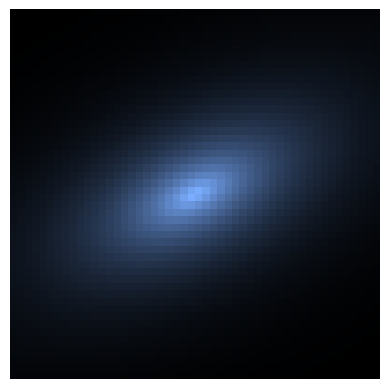
Disk
Let’s now build the disk component of our composite galaxy.
Starting by defining the morphology:
[5]:
morph = Sersic2D(
    r_eff=2.0 * kpc, sersic_index=1.0, ellipticity=0.5, theta=35.0
)
Define the parameters of the star formation and metal enrichment histories
[6]:
sfh_p = {"max_age": 10 * Myr}
Z_p = {
    "log10metallicity": -2.0
}  # can also use linear metallicity e.g. {'Z': 0.01}
stellar_mass = 10**9.5 * Msun
Define the functional form of the star formation and metal enrichment histories
[7]:
sfh = SFH.Constant(**sfh_p)  # constant star formation
metal_dist = ZDist.DeltaConstant(**Z_p)  # constant metallicity
Get the 2D star formation and metal enrichment history for the given SPS grid. This is (age, Z).
[8]:
stars = Stars(
    grid.log10ages,
    grid.metallicities,
    sf_hist=sfh,
    metal_dist=metal_dist,
    initial_mass=stellar_mass,
    morphology=morph,
)
Imaging
Before we can make any images, we need to define a PhotometricImager with the resolution of our images and filters attached. Like many other inputs to Synthesizer, both the resolution and FOV must have units associated to them to enable the code to internally transform all quantities to a consistent unit system.
Now we can initialise the Galaxy object, make an image and plot it. In this case, we can make a colour image using our UVJ filters:
[9]:
from synthesizer.instruments import PhotometricImager

# Initialise Galaxy object
disk = Galaxy(stars=stars)

# Generate stellar spectra
incident = IncidentEmission(grid)
disk.stars.get_spectra(incident)

# Get photometry
disk.get_photo_lnu(filters)

# Make images
instrument = PhotometricImager(
    label="DemoInstrument", resolution=0.1 * kpc, filters=filters
)
disk_img = disk.get_images_luminosity(
    "incident",
    fov=fov,
    instrument=instrument,
)

print(disk)

# Make and plot an rgb image
disk_img.make_rgb_image(rgb_filters={"R": "J", "G": "V", "B": "U"})
fig, ax, _ = disk_img.plot_rgb_image(show=True)
+-----------------------------------------------------------------------------+
|                                   GALAXY                                    |
+-------------+---------------------------------------------------------------+
| Attribute   | Value                                                         |
+-------------+---------------------------------------------------------------+
| galaxy_type | 'Parametric'                                                  |
+-------------+---------------------------------------------------------------+
| stars       | <synthesizer.parametric.stars.Stars object at 0x7ff49b5feb30> |
+-------------+---------------------------------------------------------------+
| name        | 'parametric galaxy'                                           |
+-------------+---------------------------------------------------------------+
Bulge
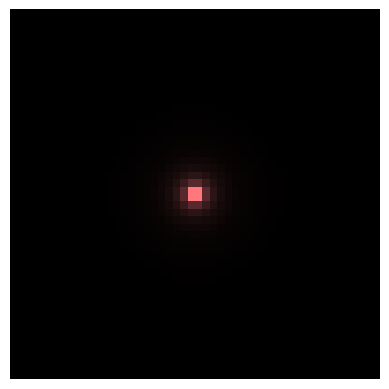
Let’s do the same but make a Bulge this time to combine. We’ll again define a PhotometricImager with the resolution and filters attached before creating images.
[10]:
from synthesizer.instruments import PhotometricImager

# Define bulge morphology
morph = Sersic2D(r_eff=0.5 * kpc, sersic_index=4.0)

# Define the parameters of the star formation and metal enrichment histories
stellar_mass = 10**9.2 * Msun
stars = Stars(
    grid.log10ages,
    grid.metallicities,
    sf_hist=10.0 * Myr,
    metal_dist=0.01,
    morphology=morph,
    initial_mass=stellar_mass,
)

# Get galaxy object
bulge = Galaxy(stars=stars)

# Get spectra
bulge.stars.get_spectra(incident)

# Get photometry
bulge.get_photo_lnu(filters)

# make images
instrument = PhotometricImager(
    label="DemoInstrument", resolution=0.1 * kpc, filters=filters
)
bulge_img = bulge.get_images_luminosity(
    "incident",
    fov=fov,
    instrument=instrument,
)

# Make and plot an rgb image
bulge_img.make_rgb_image(rgb_filters={"R": "J", "G": "V", "B": "U"})
fig, ax, _ = bulge_img.plot_rgb_image(show=True)
Total
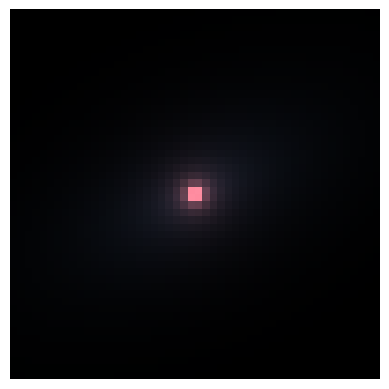
Finally we can combine the disk and bulge together to make a composite galaxy.
[11]:
# Combine galaxy objects
combined = disk + bulge

print(combined)

# Combine images
total = disk_img + bulge_img

# Make and plot an rgb image
total.make_rgb_image(rgb_filters={"R": "J", "G": "V", "B": "U"})
fig, ax, _ = total.plot_rgb_image(show=True)
+-----------------------------------------------------------------------------+
|                                   GALAXY                                    |
+-------------+---------------------------------------------------------------+
| Attribute   | Value                                                         |
+-------------+---------------------------------------------------------------+
| galaxy_type | 'Parametric'                                                  |
+-------------+---------------------------------------------------------------+
| stars       | <synthesizer.parametric.stars.Stars object at 0x7ff49b5fd300> |
+-------------+---------------------------------------------------------------+
| name        | 'parametric galaxy'                                           |
+-------------+---------------------------------------------------------------+
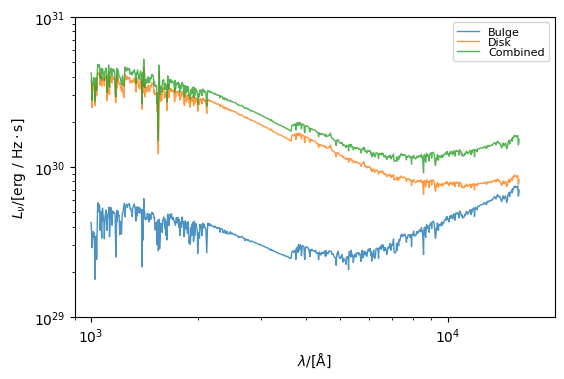
And plot the spectra for good measure…
[12]:
from synthesizer.emissions import plot_spectra

plot_spectra(
    spectra={
        "Combined": combined.stars.spectra["incident"],
        "Disk": disk.stars.spectra["incident"],
        "Bulge": bulge.stars.spectra["incident"],
    },
    show=True,
    ylimits=(10**29.0, 10**31.0),
    xlimits=(900, 10**4.3),
    figsize=(6, 5),
)
[12]:
(<Figure size 600x500 with 1 Axes>,
 <Axes: xlabel='$\\lambda/[\\mathrm{\\AA}]$', ylabel='$L_{\\nu}/[\\mathrm{\\rm{erg} \\ / \\ \\rm{Hz \\cdot \\rm{s}}}]$'>)