Emissions
Emissions are the theoretical outputs from combining a Galaxy and/or its Components with an EmissionModel (though they can also be extracted from a Grid or created explicitly with a user input). In this section, we will cover working with these objects and their generation.
Emission Objects
There are two containers for emissions in Synthesizer: the Sed and the LineCollection, for spectra and emission lines respectively. These objects are used to store the results of emission calculations, and provide methods for manipulating and analysing the emissions. A summary of each of these objects can be found in the following sections.
Emission Type Glossary
When working with premade emission models, these emission are given standard labels that reflect their origin and the masks that have been applied (though custom labels can be provided). The flowchart also shows how these different spectra are typically generated and related by an emission model.
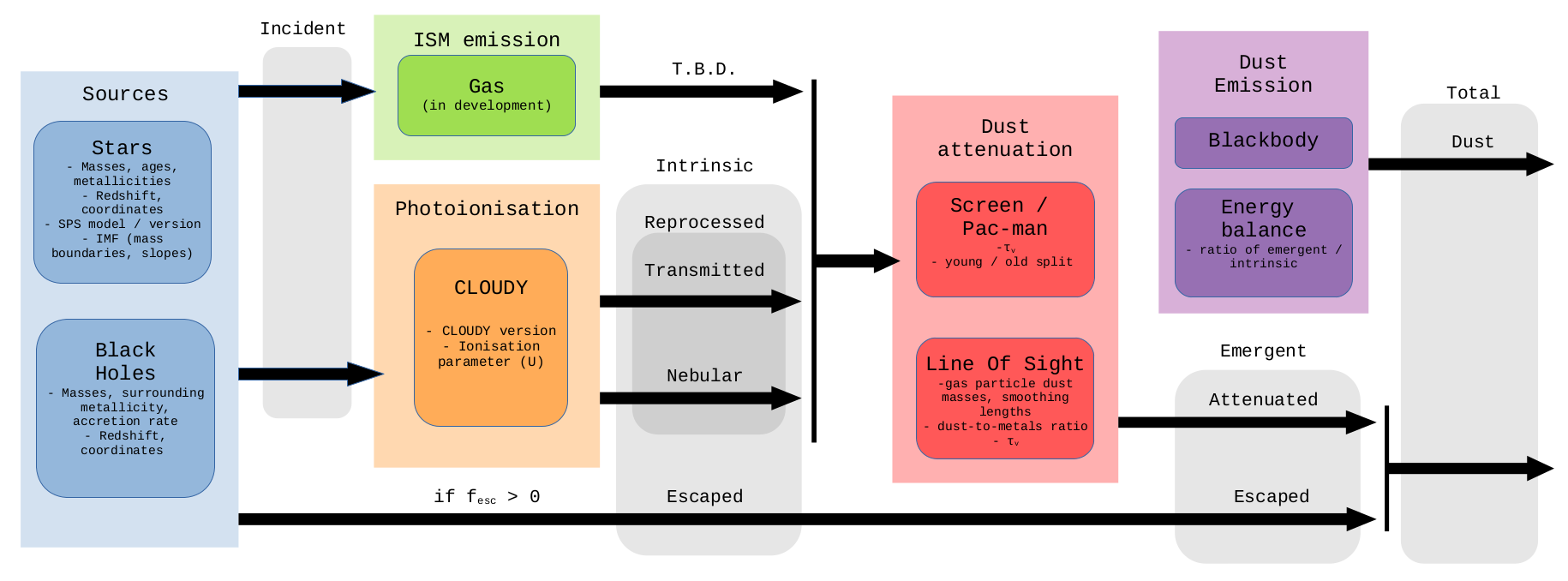
Our standard naming system, which is used in the premade EmissionModels, is listed below.
incidentspectra are the spectra that serve as an input to the photoionisation modelling. In the context of stellar population synthesis these are the spectra that are produced by these codes and equivalent to the “pure stellar” spectra.transmittedspectra is the incident spectra that is transmitted through the gas in the photoionisation modelling. Functionally the main difference betweentransmittedandincidentis that thetransmittedhas little flux below the Lyman-limit, since this has been absorbed by the gas. This depends onfesc.nebularis the nebular continuum and line emission predicted by the photoionisation model. This depends onfesc.reprocessedis the emission which has been reprocessed by the gas. This is the sum ofnebularandtransmittedemission.escapedis the incident emission that escapes reprocessing by gas. This isfesc * incident. This is not subsequently affected by dust.intrinsicis the sum of theescapedandreprocessedemission, essentially the emission before dust attenuated.attenuatedis thereprocessedemission with attenuation by dust.emergentis the combined emission including dust attenuation and is the sum ofreprocessed_attenuatedandescaped. NOTE: this does not include thermal dust emission, so is only valid from the UV to near-IR.dust_emissionis the thermal dust emission calculated using an energy balance approach, and assuming a dust emission model.totalis the sum ofattenuatedanddust, i.e. it includes both the effect of dust attenuation and dust emission.For two component dust models (e.g. Charlot & Fall 2000 or
BimodalPacmanEmission) we also generate the individual spectra of the young and old component. This includesyoung_incident,young_nebular,young_attenuatedetc.youngandoldare equivalent tototalfor the young and old components.
All premade models follow these conventions and we encourage the user to employ the same system.
Generating Emissions
Synthesizer currently supports the generation of spectra and lines for both stellar populations and AGN.
Generation of these emissions requires an emission model defining the different spectra to be generated and how they should be combined and manipulated.
With a model in hand, all that needs to be done is pass that model to the get_spectra or get_lines method on the Component or Galaxy.
The Generation Process
When an EmissionModel is passed to the emission getters (get_spectra or get_lines), Synthesizer will parse the model and determine the appropriate order in which to generate the emissions. This will start at the leaves of the network, i.e. extractions or generations that take no other emissions as input, and work its way up to the root(s) of the network.
Each step in this process can require any number of arbitrary parameters to be present. This is an important concept in using EmissionModel objects. Without this flexibility we wouldn’t be able to support entirely arbitrary models, or support future unknown extensions to the modelling machinery. Which parameters are needed by a model are defined by the operation being performed or the input Grid/Generator/Transformer passed to a model. While this may sound complicated, you will rarely define these parameters yourself, and Synthesizer will handle the details of passing them around for you.
The important thing you need to know is that whatever parameters are needed can be constants on the model, or properties of an existing emission or emitter (Component or Galaxy). Synthesizer will check each of these places in order:
Model Constants: If the model has a parameter with the name of the required parameter, it will be used. This is considered an “override” to any other value lower down the hierarchy. To set an override on a model you simply pass the parameter as a keyword argument. For instance, I might have a component with a set of variable optical depths (
tau_v) but I want to override these a test a dust screen with a constant optical depth. By passingtau_v=0.1to the model, I can override it and ignore the component’s values.Emission Properties: If the model does not have an override for a parameter, Synthesizer will next check the properties of any input emission (if one is present). This is a much rarer case, but will happen when a wavelength array is needed from an input emission. For instance, when applying a wavelength dependent scaling transformation to spectra, the wavelength array of the input emission to be scaled needs to be passed to mask the wavelengths for scaling.
Emitter Properties: If the model does not have an override for a parameter, and the emission does not have the required property, Synthesizer will next check the emitter (
ComponentorGalaxy) for the required property. This is the base case which we expect to always be true (assuming no overrides are set on the model). For instance, extracting stellar spectra from aGridfor a particleStarsobject will typically require the ages and metallicities of the particles.
Should none of the above be true, i.e. the model does not have an override, the emission does not have the required property, and the emitter does not have the required property, then Synthesizer will raise an error clearly stating the missing parameter.
The final important behaviour to note is that any parameter on any of these objects (EmissionModel, emission, or emitter) can be a string. When a string is found for a parameter it is interpreted as the name of an attribute for this parameter. Once a string is found, Synthesizer will start again at the top of the list and check the model, emisison, and emitter for the value of this attribute. For instance I might have opticals depths for different dust species on a component under tau_v_carbon and tau_v_silicate, to use there I would set up one model with tau_v=tau_v_carbon and another with tau_v=tau_v_silicate.
For more details on the different types of model operation see the Emission Models section of the documentation.
Integrated vs Particle
Synthesizer enables the generation of both integrated emissions or “per-particle” emissions (a spectra/set of lines for each individual particle). The latter of these is (unsurprisingly) only applicable for particle components (particle.Stars and particle.BlackHoles), while the former can be generated for both parametric and particle components. Galaxy level emissions are always, by definition, integrated.
It is worth noting that integrated emissions are always generated regardless of whether a particular call to get_spectra or get_lines is generating per-particle emissions or not. This is because the integrated calculation is sufficiently cheap in terms of memory and time that it is worth doing regardless. In practice this means that running a per-particle model through get_spectra or get_lines will populate partile_spectra and particle_lines as well as the spectra and lines attributes of the component or galaxy.
Example Emission Generation
In the examples below, we demonstrate this process for individual components and galaxies. Since there is a lot of degeneracy between the different components (its the same process for each), we only show the process for each component for spectra, and only demonstrate line generation for a whole galaxy.
Once you have created emissions, they can be combined with any specialised instrument object to produce a range of observables. See the observables section of the documentation for more details on this process.